
Zulip GitHub Actions integration
Get Zulip notifications from GitHub Actions workflow runs!
-
Create a bot for GitHub Actions. Make sure that you select Generic bot as the Bot type.
-
Add the
zulip/github-actions-zulip/send-message@v1action to your GitHub Actions workflow file. Thecontenttemplate parameter supports Markdown and GitHub Actions expressions.- name: Send a channel message if: steps.backup.outcome == 'failure' uses: zulip/github-actions-zulip/send-message@v1 with: # Your bot's API key and email api-key: ${{ secrets.ZULIP_API_KEY }} email: "github-actions-generic-bot@example.com" organization-url: "https://your-org.zulipchat.com" type: "stream" # Notification channel to: "github-actions updates" topic: "scheduled backups" # Example: Notify if a previous GitHub Actions step with the ID "backup" fails. content: "Backup [failed](https://github.com/${{ github.repository }}/actions/runs/${{ github.run_id }}) at <time:${{ steps.backup.outputs.time }}>.\n>${{ steps.backup.outputs.error }}"
-
Create a bot for GitHub Actions. Make sure that you select Generic bot as the Bot type.
-
Look up the ID of the recipient for DM notifications in their profile.
-
Add the
zulip/github-actions-zulip/send-message@v1action to your GitHub Actions workflow file. Thecontenttemplate parameter supports Markdown and GitHub Actions expressions.- name: Send a channel message if: steps.backup.outcome == 'failure' uses: zulip/github-actions-zulip/send-message@v1 with: # Your bot's API key and email api-key: ${{ secrets.ZULIP_API_KEY }} email: "github-actions-generic-bot@example.com" organization-url: "https://your-org.zulipchat.com" type: "private" # Recipient's user ID to: "295" # Example: Notify if a previous GitHub Actions step with the ID "backup" fails. content: "Backup [failed](https://github.com/${{ github.repository }}/actions/runs/${{ github.run_id }}) at <time:${{ steps.backup.outputs.time }}>.\n>${{ steps.backup.outputs.error }}"
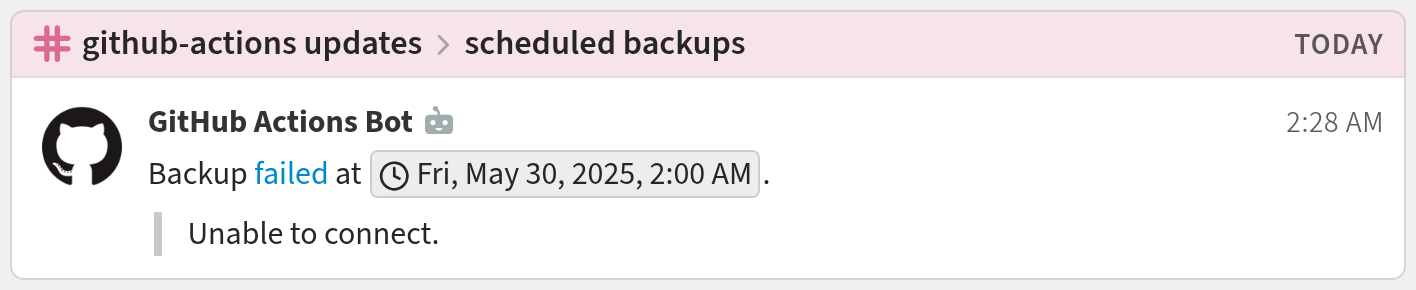
You're done! Your GitHub Actions notifications may look like this:
Related documentation
Logos are trademarks of their respective owners. None of the integrations on this page are created by, affiliated with, or supported by the companies represented by the logos.